
The Project:
Third of four workflows (create, edit, close/revive and featured) to allow non-technical users to manage website content directly from their regular Monday work environment by simply filling out a form. This scenario covered the close or revive landing page functions. To avoid 404 errors, the posts were tagged with a closed category and any posts tagged as such were excluded from search and card loops.
The Tools:
- Make
- Monday
- Jotform
- WordPress
- Kinsta
- Advanced Custom Fields
- CPT UI
- Postmark
The Solution:
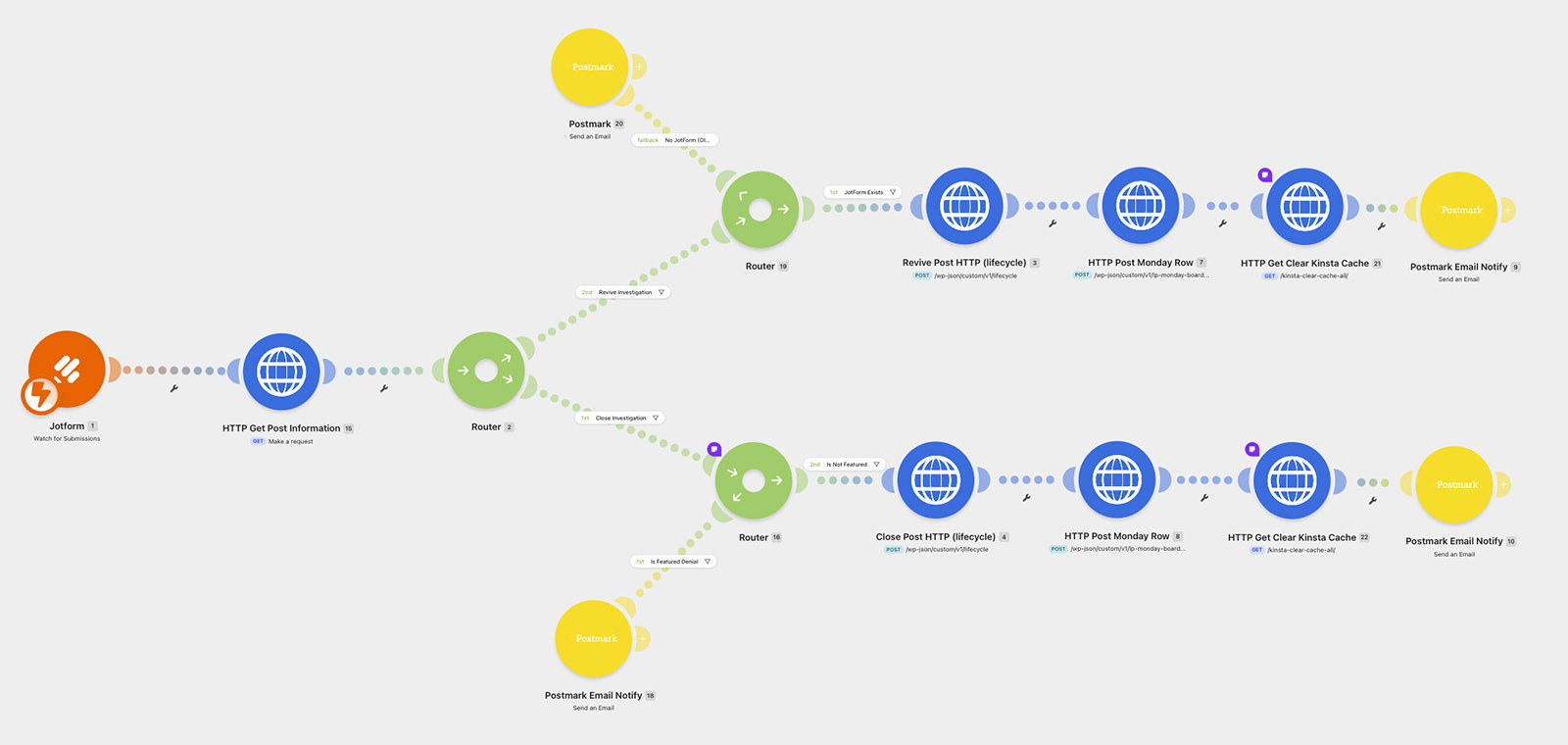
Embed a Jotform into a Monday board. The Make scenario is triggered by listening to the Jotform submission. Based on the provided post ID the custom post is found and then routed through the requested path.
REVIVE PATH
This path first checks that the post still uses the current Jotform-based structure, rather than an older page still running a legacy HubSpot form — those were being phased out manually, since building automation for a form system already on its way out wasn't worth the development time. If the post is on the older structure, the process halts and the requestor is notified to submit a new landing page form instead, effectively rebuilding it on the current system.
If the post is of the correct type, a module removes the closed category from the post and updates an ACF field where the form is embedded to remove the closed message and remove the code that hides the contact form on closed posts.
The next module updates the Monday board listing where all landing pages are listed (mirrors exactly the current state of the WordPress backend).
This is followed up by clearing the cache at Kinsta to reflect the page as live on the front end (the changes above do not trigger a modification natively) and then a message is sent to the requestor letting them know the page is live.
CLOSE PATH
The closed path is gated by a check to see if the post is currently categorized as a featured post (if one of three cards at the top of the home page). If it is featured, the scenario stops and sends the requestor a message to first submit the featured form.
If the post is not featured, the scenario moves on to add the closed category to the post and update the ACF form field to code out the form and display a closed message instead.
Then the Monday board line item is updated to reflect the closed status, a Kinsta cache clear so the frontend is accurate and a notification that the post has been closed.
The Result:
Before this system, closing a landing page meant simply unpublishing the WordPress post — which produced a steady stream of 404 errors, since marketing was often still actively driving traffic to campaigns already in motion. Replacing that with a true closed state — clear messaging and a disabled form, rather than a dead link — eliminated that broken experience entirely. With dozens of pages opening or closing in a given week, non-technical staff now handle all of it directly, with no IT ticket and no marketing request.